How to share large files without WeTransfer (2026)
WeTransfer has become the default answer when someone asks “how do I send a large file?” It works, it is fast and you do not need an account to use it. But once you move beyond casual one-off transfers, the cracks start to show. Size limits, expiring links, and the uncomfortable reality that your files sit on someone else’s servers.
If you regularly share large files for work — video deliverables, design assets, project archives, dataset exports — you need something with more control. This guide covers the limitations of WeTransfer-style services, the most common alternatives and where each one falls short and a different approach that keeps your files in your own cloud storage while giving you secure, shareable links.
The problem with WeTransfer
WeTransfer is convenient, but its free tier comes with serious constraints:
- 3 GB per transfer, 10 transfers per month. Fine for a few photos. Not enough for a video edit, a design package or a database backup. And once you hit 10 transfers in a rolling 30-day window, you are locked out until older transfers age out.
- Links expire in 3 days. If your recipient does not download the file within three days, it is gone. You have to upload it again.
- Files are stored on WeTransfer’s servers. You are uploading your data to a third party. For sensitive business files, client deliverables or anything covered by data handling agreements, this can be a compliance issue.
- Recipient data is collected. WeTransfer tracks downloads and collects information about the people accessing your files.
- No download limits or audit trail. Once the link is out there, you have no visibility into how many times it has been accessed or by whom.
WeTransfer does offer password protection on the free plan (with an account), which is a recent improvement. But the paid tiers — Starter at $6.99/month and Ultimate at around $23/month — are needed for larger transfers, longer link expiration and unlimited sends. Even then, your files still live on their infrastructure.
Why professionals need something better
The core issue is not that WeTransfer is bad. It is that file-sharing needs grow quickly once you are past the “send it once and forget about it” stage.
Professionals who share files regularly need larger file support (10 GB, 50 GB, sometimes hundreds of gigabytes), links that stay active as long as the project demands, password protection as a default rather than a premium add-on, some kind of audit trail so you know who downloaded what and above all, control over where the data lives. If your files contain client work, medical records, legal documents or proprietary research, storing them on a third-party transfer service — even temporarily — may violate your data handling obligations.
Common alternatives and their trade-offs
Before we get to the approach we recommend, here is a quick look at what people typically try first.
Email attachments
The 25 MB attachment limit makes email useless for large files. Some providers allow up to 50 MB, but that is still far below what most professionals need. Email was designed for messages, not file delivery.
Google Drive, Dropbox and OneDrive
Cloud storage platforms can share files via links, but they come with their own friction. Recipients often need an account to download. Storage limits apply to your plan, meaning shared files eat into your quota. You are locked into one provider’s ecosystem. And if you are already storing your files on S3 or R2, duplicating them into Google Drive just to share them creates an unnecessary copy that you then need to manage.
Self-hosted solutions (Nextcloud, ownCloud)
Self-hosted platforms give you full control, which is their strength and their weakness. You get the features, but you also get the server maintenance, the security updates, the storage provisioning and the uptime responsibility. For teams with dedicated IT staff, this can work well. For everyone else, it is more infrastructure than the problem demands.
FTP and SFTP
Still used in some industries, but the user experience is painful. Recipients need an FTP client, credentials and instructions. There is no download page, no password-per-link, no expiration control. It solves the size problem but creates a usability problem.
A different approach: object storage plus shareable links
There is a middle ground between uploading your files to a third-party service and running your own server. If you already use object storage — Amazon S3, Cloudflare R2, DigitalOcean Spaces or Wasabi — your files are sitting in infrastructure you control. The missing piece is a way to share those files with people who do not have access to your bucket.
This is the approach Nubbo takes. Instead of uploading your files to yet another platform, Nubbo connects to your existing cloud storage and generates secure share links for the files and folders already there. When someone clicks your link, the file transfers directly from your storage provider to their browser via a presigned URL. Nubbo never touches the data.
How it works with Nubbo
The setup takes about two minutes:
Connect your storage provider. Sign into Nubbo and add your S3, R2, Spaces or Wasabi credentials. Nubbo encrypts them with AES-256-GCM and uses them solely to interact with your bucket on your behalf.
Browse your files. Nubbo’s file browser shows the contents of your bucket in a familiar folder-and-file interface. Navigate to the file or folder you want to share.
Click share. Select a file or an entire folder and create a share link. The link is generated instantly.
Set protection options. Add a password, set an expiration date, define a download limit or use any combination of the three. These controls are available on every share — not locked behind a premium tier.
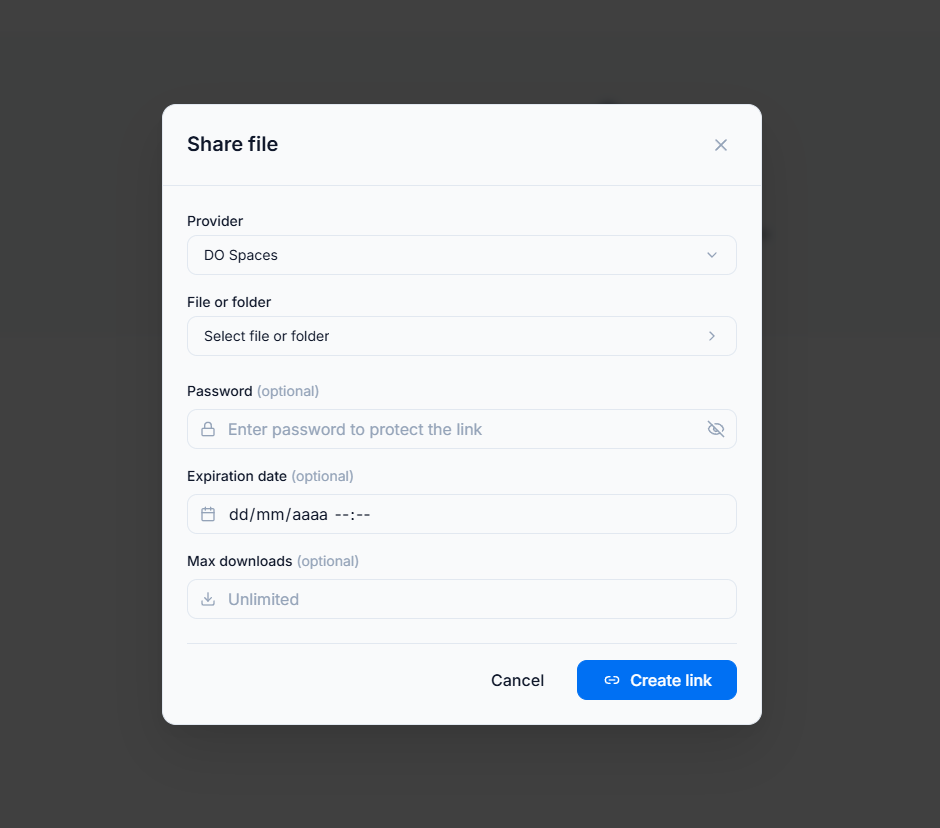
- Send the link. Copy it and send it however you like: email, Slack, a project management tool, a text message. The recipient sees a clean download page. They do not need a Nubbo account, AWS credentials or any special software.
That is it. No re-uploading, no waiting for a transfer to complete (the file is already in your bucket), no worrying about link expiration unless you set one deliberately.
What you get that WeTransfer does not offer
No file size limits imposed by the sharing tool. The limits are those of your storage provider, and most S3-compatible providers support objects up to 5 TB. If your provider can store it, Nubbo can share it.
Links that last as long as you need. There is no forced expiration. Set one if you want to, or leave the link active indefinitely. You can revoke it at any time.
Password protection and download limits on every share. Not a premium feature. Not an add-on. Every share link can be protected with a password and limited to a specific number of downloads.
Your data stays in your infrastructure. Files are never copied to or routed through Nubbo’s servers. The transfer happens directly between your storage provider and the recipient’s browser. This is a fundamental architectural difference, not just a marketing claim — you can verify it by inspecting the network requests.
Folder sharing. Share an entire folder with a single link. The recipient sees the folder contents and can download individual files or everything at once.
Photo galleries. For image-heavy sharing — client proofs, product photography, event coverage — Nubbo can present your images as a photo gallery with watermarks and a clean browsing experience, rather than forcing recipients to download a ZIP.
Receive files too. Need someone to send files to you? File requests generate an upload link that deposits files directly into your bucket, without giving the uploader access to anything else.
Being honest about trade-offs
WeTransfer is simpler for true one-off sends. If you need to send a file to someone once and you will never think about it again, WeTransfer’s drag-and-drop interface is hard to beat. There is no setup, no account required and it just works.
The Nubbo approach makes more sense when you share files regularly, when your files are already in cloud storage, when you need password protection or expiration controls, when you deal with files larger than 3 GB or when your workflow demands that data stays in infrastructure you control. It is not a direct replacement for WeTransfer’s casual simplicity — it is a more capable tool for professional file delivery.
You also need an S3-compatible storage account. If you do not already have one, there is a small setup step involved. That said, providers like Cloudflare R2 offer generous free tiers that make the entry cost essentially zero.
Getting started
If you are tired of 3 GB limits, disappearing links and uploading your files to servers you do not control, the object storage approach is worth trying.
Create a free Nubbo account, connect your storage provider and share your first file. Your data stays in your bucket, the recipient gets a clean download page and you keep full control over access — including the ability to add passwords, set expiration dates and revoke links whenever you need to.