S3 presigned URLs explained: how they work and when to use them (2026)
If you have ever needed to give someone access to a file in a private S3 bucket without changing permissions or making anything public, presigned URLs are the answer. They are one of the most useful and underappreciated features of Amazon S3, and they work across S3-compatible providers like Cloudflare R2, DigitalOcean Spaces, Wasabi and Backblaze B2.
This guide explains what presigned URLs are, how they work under the hood, how to generate them for downloads and uploads, and what their security limitations are. We will also look at how Nubbo uses presigned URLs internally to transfer files directly between your browser and your storage provider without ever touching the data.
What is a presigned URL?
A presigned URL is a temporary URL that grants access to a specific object in a private S3 bucket. The URL contains a cryptographic signature derived from your AWS credentials, the object key and an expiration timestamp. Anyone who has the URL can perform the action it was signed for (download or upload) until the URL expires. After that, the URL returns an error.
The important part is that the bucket itself stays private. You are not changing any permissions. You are creating a one-time-use pass for a specific object and a specific action.
Presigned URLs are generated entirely on the client side (or on your backend) using your credentials. No API call to S3 is needed to create the URL itself. S3 only validates the signature when someone actually uses the URL.
How presigned URLs work technically
When you generate a presigned URL, the following components are included in the query string:
- X-Amz-Algorithm — The signing algorithm (typically
AWS4-HMAC-SHA256). - X-Amz-Credential — Your access key ID, the date, the region and the service.
- X-Amz-Date — The timestamp when the URL was created.
- X-Amz-Expires — How many seconds the URL is valid for.
- X-Amz-SignedHeaders — The headers included in the signature calculation.
- X-Amz-Signature — The HMAC-SHA256 signature computed from all the above plus the object key and HTTP method.
When someone opens the URL, S3 reconstructs the signature using the same parameters and the secret key associated with the access key ID. If the signatures match and the URL has not expired, S3 serves the response. If anything has been tampered with — the object key, the expiration, any parameter — the signature check fails and the request is denied.
This is the same Signature Version 4 mechanism that secures all authenticated AWS API calls, just encoded into a URL instead of a request header.
Presigned URLs for downloads (GET)
The most common use case is generating a presigned URL to let someone download a file from a private bucket. The URL is signed for the GET HTTP method, so it can only be used to read the object.
Using the AWS CLI:
aws s3 presign s3://my-bucket/reports/quarterly-2026.pdf --expires-in 3600This returns a URL that is valid for one hour. You can send it to anyone and they can download the file by opening it in a browser or using curl. No AWS credentials needed on their end.
Using the AWS SDK for Python (boto3):
import boto3

s3 = boto3.client('s3')
url = s3.generate_presigned_url(
    'get_object',
    Params={'Bucket': 'my-bucket', 'Key': 'reports/quarterly-2026.pdf'},
    ExpiresIn=3600
)
print(url)
Both methods produce the same result: a long URL with query parameters containing the signature and expiration.
Presigned URLs for uploads (PUT)
Presigned URLs also work in the other direction. You can generate a URL that allows someone to upload a file to a specific key in your bucket, without giving them any credentials.
This is useful when you want external users to submit files (think form uploads, client deliverables or user-generated content) without exposing your bucket or routing the file through your own server.
Example using boto3:
import boto3

s3 = boto3.client('s3')
url = s3.generate_presigned_url(
    'put_object',
    Params={
        'Bucket': 'my-bucket',
        'Key': 'uploads/client-brief.pdf',
        'ContentType': 'application/pdf'
    },
    ExpiresIn=3600
)
print(url)
The recipient can then upload a file using a simple PUT request:
curl -X PUT -H "Content-Type: application/pdf" \
  --upload-file client-brief.pdf \
  "PRESIGNED_URL_HERE"
The file goes directly to S3. Your server never handles the bytes.
Multipart uploads with presigned URLs
For large files (typically over 100 MB), S3 supports multipart uploads. Instead of sending the entire file in a single request, you split it into parts and upload each part separately. This improves reliability (a failed part can be retried without restarting the whole upload) and allows parallel uploads for better throughput.
Presigned URLs can be generated for each individual part of a multipart upload. The flow looks like this:
- Initiate the multipart upload via the S3 API to get an upload ID.
- Generate a presigned URL for each part using the upload ID and part number.
- Upload each part using the presigned URLs.
- Complete the multipart upload by sending the list of parts and their ETags.
This is more complex than a simple PUT, but it is the only reliable way to upload very large files. Most tools and SDKs handle this automatically.
Security considerations
Presigned URLs are powerful, but they come with limitations you need to understand:
Maximum expiration. When using IAM user credentials, the maximum expiration is 7 days (604,800 seconds). With temporary credentials from STS (such as those from an assumed role), the limit is shorter — typically 12 hours or the remaining duration of the session token, whichever is less.
URLs can be shared or leaked. A presigned URL is a bearer token. Anyone who has it can use it. If a recipient forwards the URL or it shows up in browser history, server logs or a chat archive, the file is accessible to whoever finds it.
No password protection. S3 presigned URLs have no native mechanism for requiring a password. If you need password-protected sharing, you need to build that layer yourself or use a tool that provides it.
No download tracking. S3 access logs will record requests, but there is no built-in way to see who downloaded a file, how many times it was downloaded or whether the URL was shared with unintended recipients.
No revocation. Once a presigned URL is generated, it cannot be revoked individually. The only way to invalidate it before expiration is to delete the object, change the bucket policy to deny access or deactivate the IAM credentials used to sign it. All of those are blunt instruments.
URL exposes metadata. The URL itself contains your bucket name, the full object key and your access key ID. While the access key ID alone is not a security risk, the bucket name and key path may reveal information about your infrastructure or file organization.
How Nubbo uses presigned URLs
Nubbo is a web-based file browser and sharing tool that connects to your S3-compatible storage. Under the hood, every file transfer in Nubbo — both uploads and downloads — is powered by presigned URLs.
When you upload a file through Nubbo’s interface, the backend generates a presigned PUT URL (or a set of presigned URLs for each part of a multipart upload if the file is large). Your browser then sends the file directly to your storage provider using that URL. Nubbo’s servers never receive or store the file data.
Downloads work the same way. When you download a file or when someone accesses a shared link, Nubbo’s backend generates a presigned GET URL and the browser fetches the file directly from your provider.
This architecture means that Nubbo acts as an orchestration layer, not a proxy. Your files travel on the shortest path between the browser and the storage provider. This works identically across AWS S3, Cloudflare R2, DigitalOcean Spaces, Wasabi and Backblaze B2, as well as any S3-compatible or self-hosted server.
Your storage credentials are encrypted with AES-256-GCM and are only used server-side to generate the presigned URLs. They are never exposed to the browser. You can read more about the security model on the security page.
Adding protection on top of presigned URLs
Raw presigned URLs solve the access problem but leave gaps in control: no passwords, no download limits, no tracking. Nubbo’s file sharing feature fills those gaps.
When you share a file through Nubbo, you can set a password, an expiration date and a maximum number of downloads. The recipient sees a clean download page instead of a raw URL that exposes your bucket name and object key.
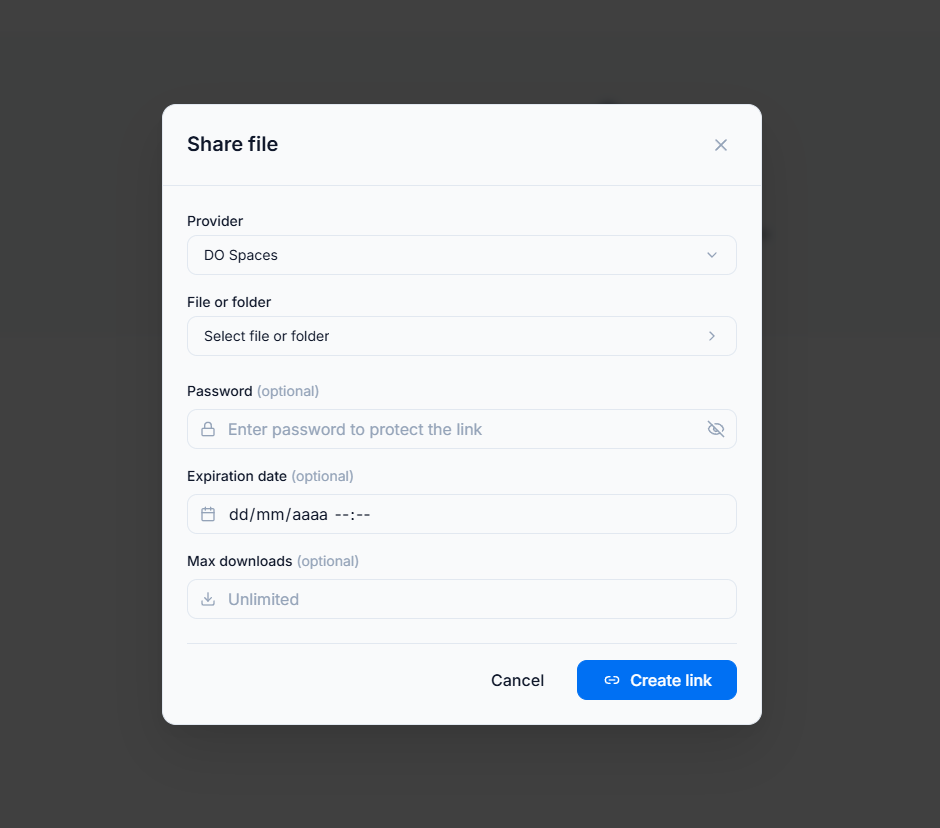 Behind the scenes, Nubbo only generates the presigned URL after verifying the password and checking the download limit. If the limit has been reached or the link has expired, no presigned URL is generated and the file cannot be accessed.
This gives you the best of both worlds: the direct browser-to-provider transfer of presigned URLs with the access controls of a managed sharing platform.
If you are interested in the sharing workflow in more detail, we covered it in a previous post: How to share files from S3 without making them public.
Getting started
Presigned URLs are one of the most practical tools in the S3 ecosystem. Whether you generate them from the CLI for a quick one-off share or rely on a tool that uses them transparently for every file operation, they let you keep your buckets private while still making files accessible when they need to be.
If you want a visual interface that handles presigned URLs, multipart uploads, password-protected sharing and download tracking automatically, create your free Nubbo account and connect your first bucket in under two minutes. Your files stay in your storage, transferred directly between the browser and your provider, with no data passing through any third-party server.